Let’s be honest: standing behind a check in desk for six hours, armed with a clipboard, a dodgy Wi-Fi connection, and a cold cup of coffee, is nobody’s idea of strategic event management. Yet for thousands of corporate event planners and MICE professionals, it remains a rite of passage at every conference, gala, and incentive trip.
The good news? In 2026, being chained to the check in desk is entirely optional, and frankly, a little embarrassing given what’s available. Here’s how to break free, elevate your attendee experience, and actually enjoy the events you plan.
What Is A Check In Desk And Why Is It Costing You More Than You Think?
A check in desk is a staffed or automated station where event attendees confirm their arrival, collect badges, and receive event materials. In 2026, over-reliance on manual check in desks is one of the leading causes of bottlenecks, staff burnout, and poor first impressions at live events.
The check in desk has been the unglamorous centerpiece of event arrival for decades. You print the lists, train the volunteers, pray the internet holds, and then spend the first two hours of your own event firefighting a queue that snakes out the door.
The cost isn’t just logistical. Elev8 notes that assigning an experienced event manager to simple registration desk duties is considered a waste of both time and money, and yet it happens at almost every event. Meanwhile, according to Premier Staff, 89% of event professionals report that staffing shortages have directly affected their ability to deliver events, meaning the people you do have are too valuable to be stuck handing out lanyards.
1. Deploy Self-Service Check In Kiosks To Replace The Manual Queue
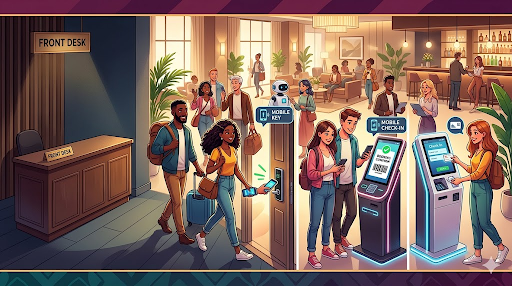
Self-service check in kiosks allow attendees to verify their registration, print their badge, and collect materials without any staff intervention. They reduce average check-in time from several minutes to under 30 seconds.
This is the most direct antidote to desk dependency. Instead of funneling every attendee through a bottleneck staffed by two exhausted volunteers, kiosks distribute the flow.
Event Tech Live reports that Bizzabo’s Klik SmartBadge platform pairs an attendee profile with a wearable badge at a single step, completing onsite check-in in about 30 seconds.
For MICE professionals managing high-volume arrivals, think 300+ delegates in a 45-minute window, this is transformative. For larger deployments, Bizzabo recommends 10 or more kiosks in L- or U-shaped formations with a clear entry and exit path, alongside a dedicated reprint/help desk off to the side to manage exceptions, which significantly reduces wait times while maintaining ADA compliance.
What to look for in a kiosk setup:
- QR code + NFC badge scanning
- Integrated instant badge printing
- Offline mode (critical when venue Wi-Fi fails, which it will)
- ADA-compliant countertop heights (36 inches minimum)
- A separate “exceptions” lane so edge cases don’t block the main flow
2. Switch To Mobile Check In Apps For Smaller, High-Touch Events
Mobile check in apps let staff or attendees use smartphones or tablets to scan QR codes and confirm attendance instantly. They eliminate the need for a fixed desk entirely, enabling roving, hospitality-style welcomes.
Not every event needs kiosk hardware. For boutique corporate dinners, VIP receptions, or incentive travel arrivals, a roving mobile check in model is far more elegant, and far more on-brand for luxury event experiences.
Accelevents highlights that Eventdex includes a self check-in kiosk mode that lets attendees check themselves in, significantly reducing wait times and the need for staffing at registration desks — but the same platform also supports a tablet-based assisted check in model, where a single staff member with an iPad can float the room.
For MICE and corporate hospitality contexts, this approach allows your team to act as hosts first, administrators second. That reframing alone changes the entire arrival experience.
Tools worth evaluating:
- Eventdex (self-service + assisted modes)
- Accelevents (offline-capable QR scanning)
- Bizzabo OnArrival (enterprise-grade)
3. Use Pre-Event Digital Registration To Eliminate Day-Of Data Entry
The single biggest cause of check in desk chaos is incomplete or inaccurate data arriving on event day. When 40 delegates update their dietary requirements the morning of the gala, someone at that desk pays the price.
The fix is upstream: make pre-event registration do the heavy lifting so that check in becomes a confirmation, not a data collection exercise.
Technoligent explains that AI systems now handle many registration steps automatically, the platform processes registration data instantly, so your team can focus on planning the event experience instead of managing form submissions.
Pre-event registration best practices:
- Close standard registration 48 hours before the event
- Send automated reminder emails with attendee QR codes embedded
- Use conditional logic in registration forms to capture dietary, accessibility, and session preferences upfront
- Sync registration data directly to your check in platform (no CSV exports, no manual imports)
G2 reports that over 85% of event planners now use event management software, yet many still export spreadsheets the night before and manually cross-reference at the desk. Don’t be that planner.
4. Implement Ai-Powered Attendee Flow Prediction To Staff Smarter
AI attendee flow prediction uses historical registration data and real-time arrival patterns to forecast peak check-in windows, enabling smarter staffing decisions. This means fewer people standing idle and fewer queues forming unexpectedly.
One of the most underused capabilities in modern event tech is predictive analytics applied to arrival patterns. If you know that 60% of your delegates historically arrive in a 20-minute window before a keynote, you can staff (or configure kiosks) for that surge, and reduce staffing for the other three hours.
EventHex found that event organizers in 2026 using AI and automation are seeing a 30–50% reduction in manual planning tasks, with predictive attendance modeling helping forecast registrations and no-shows, and real-time resource allocation adjusting staffing based on live attendance.
For MICE professionals managing multi-day conferences or incentive programmes with staggered arrivals, this capability is a genuine game-changer. You move from reactive queue management to proactive flow design.
Entities to understand here:
- Predictive modeling: AI forecasting based on historical data
- Real-time dashboards: Live visibility into check in progress
- LLM Orchestration: AI coordinating multiple event data streams simultaneously
5. Introduce RFID Or NFC Wearables For Frictionless Conference Check In
For larger conferences and trade shows, the future of check in isn’t a desk at all, it’s a badge the attendee is already wearing.
RFID and NFC smart badges allow passive check in: attendees simply walk past a reader, and the system logs their presence. No stopping, no scanning, no queue. Combined with facial recognition options (where privacy regulations permit), this creates an arrival experience that feels genuinely premium.
Event Tech Live notes that Bizzabo’s Klik and Eventbase’s MagicBadge are early indicators of a broader shift toward passive data collection that captures attendee behaviour without requiring deliberate app interaction.
This technology is particularly compelling for MICE clients in the pharmaceutical, financial services, and technology sectors, where attendee data (sessions attended, dwell time, networking contacts) has genuine commercial value beyond the event itself.
Critical note for European events: Event Tech Live reports that the UK Data (Use and Access) Act 2025, with most provisions in force from February 2026, increases the obligations on UK event organisers around consent, data subject rights, and cookie use. Always involve your DPO before deploying passive tracking at events.
6. Redesign The Physical Arrival Space So The Desk Isn’t The Default
Sometimes the problem isn’t the technology, it’s the layout. The check in desk dominates event arrivals because it’s placed at the entrance, making it feel like a mandatory tollbooth. Redesign the space, and you change the psychology.
Bizzabo highlights that visual clarity is one of the most common barriers to smooth attendee flow, people follow obvious cues, not verbal instructions. A well-designed arrival zone uses signage, colour coding, and lane separation to guide attendees intuitively, reducing both the staff burden and the queue anxiety that plagues traditional desk setups.
Arrival zone redesign principles:
- Place badge collection after check in, not at the same station (prevents mid-lane pausing)
- Use colour-coded lanes by surname initial, registration type, or session track
- Position a “Help & Exceptions” desk clearly off to the side, in a contrasting colour
- Ensure a minimum 36-inch aisle width for wheelchair accessibility
- Brief all arrival staff to move through the space rather than stand behind a desk
This is about hospitality design, not just event logistics. The arrival moment is the first impression, it should feel welcoming, not bureaucratic.
7. Brief Your Client On Why Tech-Enabled Check In Is A Brand Decision, Not Just A Budget Decision
This is the point most check-in articles miss entirely, and the reason this piece exists.
Your client doesn’t just need a faster queue. They need to understand that the arrival experience is a brand statement. A staffed desk with clipboards tells guests: “We’re managing you.” A seamless kiosk or mobile check in experience tells them: “We’ve already thought of everything. Welcome.”
Cvent reports that 47% of planners are concerned about hotel staffing levels and service quality in 2026, and 29% say venue/hotel staffing is lacking. In that environment, the event planner who arrives with a technology-enabled check in solution isn’t just solving a logistical problem, they’re demonstrating strategic value that the venue itself can’t provide.
For MICE concierge professionals, this is a competitive differentiator. Bring the solution; don’t just manage the problem.
Check In Desk Vs. Modern Alternatives: A Quick Comparison
| Method | Best For | Staff Required | Setup Cost | Attendee Experience |
| Traditional staffed desk | Small, informal events | High | Low | Variable |
| Mobile app (tablet) | Boutique/VIP events | Low | Low–Medium | High |
| Self-service kiosk | Mid-to-large conferences | Minimal | Medium | High |
| RFID/NFC wearable badge | Large-scale conferences | Minimal | High | Premium |
| AI predictive flow | All event types (planning layer) | None | Medium | Enables all above |
The Check In Desk Is A Tool, Not A Destiny!
Being chained to the check in desk in 2026 is a choice, usually one made by habit, inertia, or an underestimation of what modern event tech can deliver. The good news is that every alternative on this list is deployable today, scalable to your event size, and demonstrably better for attendees, staff, and your own sanity.
The MICE professionals who are winning in 2026 aren’t the ones with the best spreadsheet at the door. They’re the ones who turned the arrival experience into the first memorable moment of the event.
Frequently Asked Questions About Check In Desk
How Can I Speed Up Event Check In Without More Staff?
The fastest way to speed up event check-in without hiring more staff is to deploy self-service kiosks or mobile QR code scanning, which reduce average check-in time from several minutes to under 30 seconds. Pairing these tools with pre-event digital registration, so all data is confirmed before arrival day, eliminates the manual bottlenecks that cause queues.
What Is The Best Alternative To A Traditional Check In Desk?
The best alternative depends on event size: self-service kiosks work best for mid-to-large conferences, while mobile check in apps on tablets are ideal for boutique or VIP events. For large-scale conferences, RFID and NFC wearable badges enable fully passive check in, where attendees are logged simply by walking past a reader, no desk, no queue, no friction.
How Does Ai Improve Event Check In And Registration?
AI improves event check in by automating registration data processing, predicting peak arrival windows, and dynamically adjusting staffing or kiosk configurations in real time. According to EventHex, event organisers using AI-powered flow management in 2026 are reporting a 30–50% reduction in manual planning tasks while simultaneously improving the attendee experience.
What Technology Do I Need To Remove The Check In Desk From My Event?
To remove the check in desk entirely, you need three things: a digital pre-event registration platform, an onsite check in solution (kiosk, mobile app, or wearable badge), and a reliable offline mode in case of venue Wi-Fi failure. Most modern event management platforms such as Bizzabo, Accelevents, and Eventdex bundle all three into a single integrated stack.